
Microsoft Teams will add message previews to channel, mention, and reaction notifications on Windows, Mac, and web starting mid-December 2025. Users can disable previews via notification settings. No admin action or policy changes are needed; the feature activates with client updates.
[Introduction]
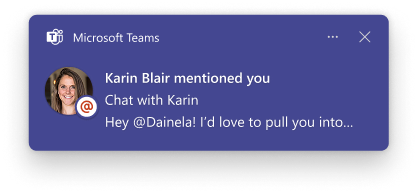
Microsoft Teams is improving the notification experience by adding message previews to more types of notifications, including channels, mentions, and reactions. This enhancement helps users quickly assess the importance of a notification without switching context, prioritize responses more effectively, and enjoy a consistent experience across platforms.This message applies to Teams for Windows desktop, Teams for Mac desktop and Teams for the web.
Screenshot: @mention notification with message preview
[When this will happen:]
- Targeted Release (Worldwide): Rollout begins mid-December 2025; expected to complete by mid-December 2025
- General Availability (Worldwide): Rollout begins mid-January 2026; expected to complete by mid-January 2026
- General Availability (GCC, GCC High, DoD): Rollout begins mid-January 2026; expected to complete by late January 2026
[How this affects your organization:]
- Who is affected: All users of Microsoft Teams on Windows and Mac desktop clients and Teams on the web.
- What will happen:
- Notifications for channels, mentions, and reactions will include a message preview, unless the message preview is disabled by users.
- Users can disable previews:
- On Windows and Web: via Teams Notification Settings.
- On Mac: via OS Notification Settings.
- No changes to existing admin policies; no policy updates required.
[What you can do to prepare:]
- No admin action is required; the feature will be available automatically once users update to the supported Teams client build.
- Consider notifying your users about this update and how they can manage notification settings.
[Compliance considerations:]
No compliance considerations identified; review as appropriate for your organization.