
[Introduction]
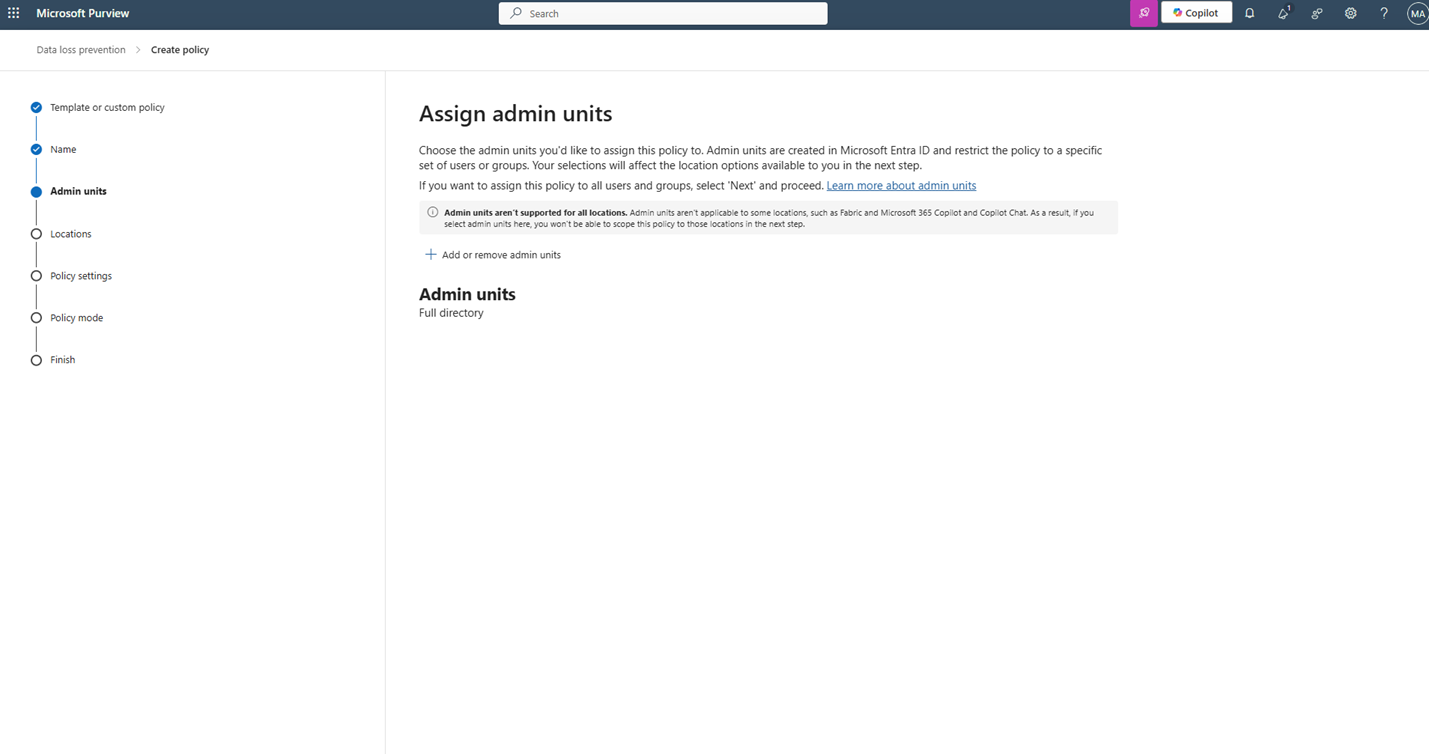
We’re adding support for assigning Microsoft SharePoint Online sites to existing administrative units in Microsoft Purview Data Loss Prevention (DLP). When you assign a DLP policy for SharePoint to an administrative unit, the policy will apply only to sites within that unit. This enhancement helps organizations manage policies more granularly and align with administrative boundaries.
Learn more about Admin units: Administrative units in Microsoft Purview portal | Microsoft Learn
This message is associated with Microsoft 365 Roadmap ID 526797.
[When this will happen:]
General Availability (GCC, GCC High, DoD): Rollout begins mid-December 2025 and is expected to complete by late December 2025.
[How this affects your organization:]
- Who is affected: Admins managing DLP policies for SharePoint Online.
- What will happen:
- You can assign SharePoint sites to administrative units and scope DLP policies accordingly.
- This feature will be available by default; no opt-in required.
- No impact to end-user workflows unless admins configure policies for specific units.
[What you can do to prepare:]
- No action is required before rollout; the feature will be enabled automatically.
- Review your current DLP configuration to determine if scoping policies by administrative unit is beneficial.
- To configure, go to Microsoft Purview compliance portal > Data loss prevention > Create policy > Assign Admin Units.
- Learn more: Support for adding SharePoint sites to Administrative Units
[Compliance considerations:]
No compliance considerations identified; review as appropriate for your organization.
