[What and Why]
Planner agent in Microsoft 365 Copilot is generally available. This capability brings Planner work management into Copilot and enables users to create, update, and manage personal tasks and shared basic plans without switching context. Planner agent provides insights into priorities, deadlines, and at-risk work, and uses interactive task cards that require users to review and confirm updates before changes are applied.
This message is associated with Microsoft 365 Roadmap ID 516576.
[Rollout Schedule]
- General Availability (Worldwide): Rollout begins in mid-June 2026 and is expected to complete by late June 2026.
[Impact on Your Organization]
Who is affected
- Users with an active Microsoft 365 Copilot license
Platforms/Services
- Microsoft 365 Copilot experiences across web and supported endpoints
What will happen
- Planner agent will be available across Microsoft 365 Copilot experiences.
- Users can find and add Planner agent from the Copilot agent store.
- Users can create, view, and update personal tasks and shared basic plans
:
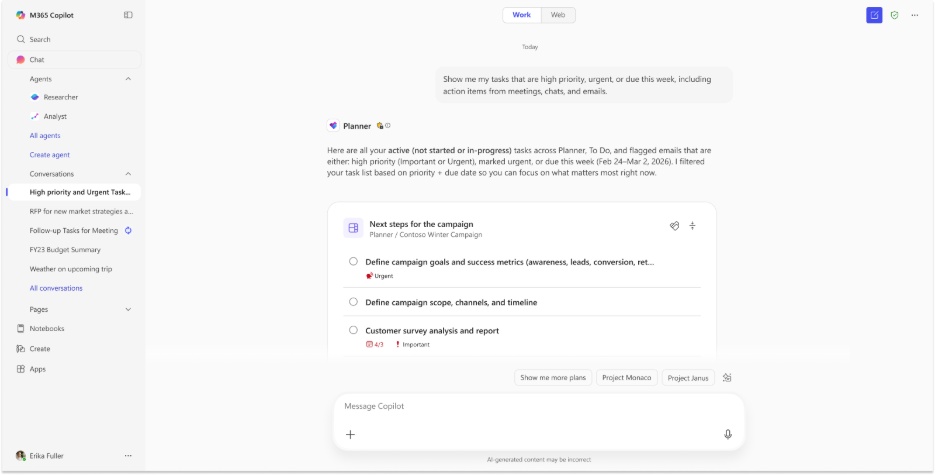
- Users can generate structured plans that include goals, buckets, task hierarchies, and improved plan organization.
- A plan selection experience is available when working with multiple plans.
- Additional task fields are supported as part of plan and task management.
- Interactive task cards are used to present suggested updates and require users to review and confirm changes before they are applied.
- Planner agent provides insights such as priorities, deadlines, and at-risk work.
- Updates since the initial Frontier release include improvements to reliability, system behavior, and overall quality.
[Action Required/Recommendations]
No immediate action is required.
Important: Planner agent is preinstalled for users based on license eligibility. The ability to restrict the agent to specific user groups is no longer available, as it is the case for all preinstalled agents today. Admins can still block the agent for the entire tenant through the Microsoft 365 admin center. For more information, review Agent installation in Microsoft 365 Copilot | Microsoft Learn.
Recommended actions:
- Confirm that users have active Microsoft 365 Copilot licenses.
- Review agent availability and settings in the admin center if needed.
- Update internal documentation if your organization tracked preview functionality.
- Inform helpdesk and users about the new Planner agent capability.
Learn more:
- Agent installation in Microsoft 365 Copilot | Microsoft 365 Copilot | Microsoft 365 | Microsoft Learn
- Manage agents in the Microsoft 365 admin center | Microsoft 365 admin center | Microsoft 365 | Microsoft Learn
[Compliance considerations]
| Question | Answer |
| Does the change alter how existing customer data is processed, stored, or accessed? | Yes. Planner agent accesses and processes existing Microsoft 365 data, including tasks, emails, meetings, and files, to provide task management insights and actions within Copilot. |
| Does the change introduce or significantly modify AI, ML, or agent capabilities that interact with or provide access to customer data? | Yes. This change introduces the Planner agent, which uses AI capabilities within Copilot to generate plans, manage tasks, and provide insights based on organizational data. |
| Does the change provide users a new way of interacting with generative AI? | Yes. Users can interact with the Planner agent using natural language prompts in Copilot to create, update, and manage tasks and plans. |
| Does the change include an admin control, and can it be controlled through Entra ID group membership? | Yes. Admins can manage Copilot agents, including Planner agent, through controls available in the Microsoft 365 admin center. |
| Does the change allow a user to enable or disable the feature themselves? | Yes. Users can choose to access and use the Planner agent within Copilot experiences where it is available. |