
summary: Microsoft 365 admin center now supports Action Segments for Organizational Messages targeting inactive Microsoft 365 Copilot users. Public Preview began mid-November 2025; General Availability starts mid-May 2026. Admins with Copilot licenses can deliver tailored messages without policy changes. No immediate action required.
Updated April 27, 2026: We have updated the timeline. Thank you for your patience.
[Introduction]
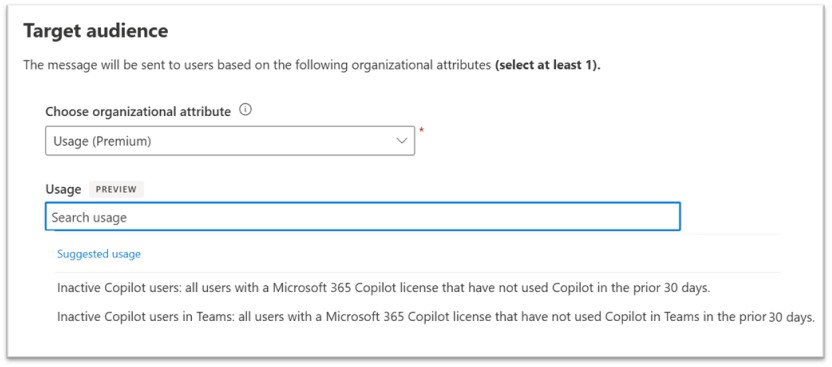
Action Segments empower IT admins to target Organizational Messages using dynamic, pre-defined usage segments. This enhancement helps admins deliver more relevant communications based on user activity. For the Public Preview, there are two Action Segments available: Inactive Microsoft 365 Copilot Users and Inactive Microsoft 365 Copilot Users in Teams.
This message is associated with Microsoft 365 Roadmap ID 503563.
[When this will happen]
- Public Preview (Worldwide): Rollout began in mid-November 2025 and is expected to complete by late January 2026.
- General Availability (Worldwide): Rollout begins in mid-May 2026 (previously late-April) and is expected to complete by late June 2026 (previously late May)
[How this will affect your organization]
- Who is affected:
- Admins managing Organizational Messages in Microsoft 365.
- Tenants with Microsoft 365 Copilot licenses (required for Action Segments to apply).
- What will happen:
- Admins can target messages based on user activity using Action Segments:
- Two pre-defined segments are available during Public Preview:
- Inactive Microsoft 365 Copilot Users
- Inactive Microsoft 365 Copilot Users in Teams
- No changes to existing admin policies; feature is additive.
[What you can do to prepare]
- No immediate action is required at this time.
- If you want to take advantage of this feature:
- Ensure your organization has Microsoft 365 Copilot licenses (required for Action Segments to apply).
- Review and configure Action Segments in the Microsoft 365 admin center.
- Communicate this change to your helpdesk or support teams.
- Update internal documentation if you detail Organizational Messages or Copilot usage.
[Compliance considerations]
No compliance impacts identified. Review your organization’s policies as needed.
