
Updated February 27, 2026: We have updated the content. Thank you for your patience.
[Introduction]
Turn scanned PDF files into editable, searchable text using built-in Optical Character Recognition (OCR) in the OneDrive mobile app. This feature helps users reuse information, speed up document workflows, and make content easier to find.
[When this will happen:]
General Availability for Worldwide, GCC, and GCCH: Rollout begins early January 2026 (previously mid-December 2025) and is expected to complete by early February 2026 (previously late January).
[How this affects your organization:]
Who is affected: All users of OneDrive mobile apps on iOS and Android.
What will happen:
- Users can recognize text in scanned PDF files directly within the OneDrive mobile app.
- The feature is enabled by default.
- To use the feature:
- Open the OneDrive mobile app.
- Open the scanned PDF you want to make searchable.
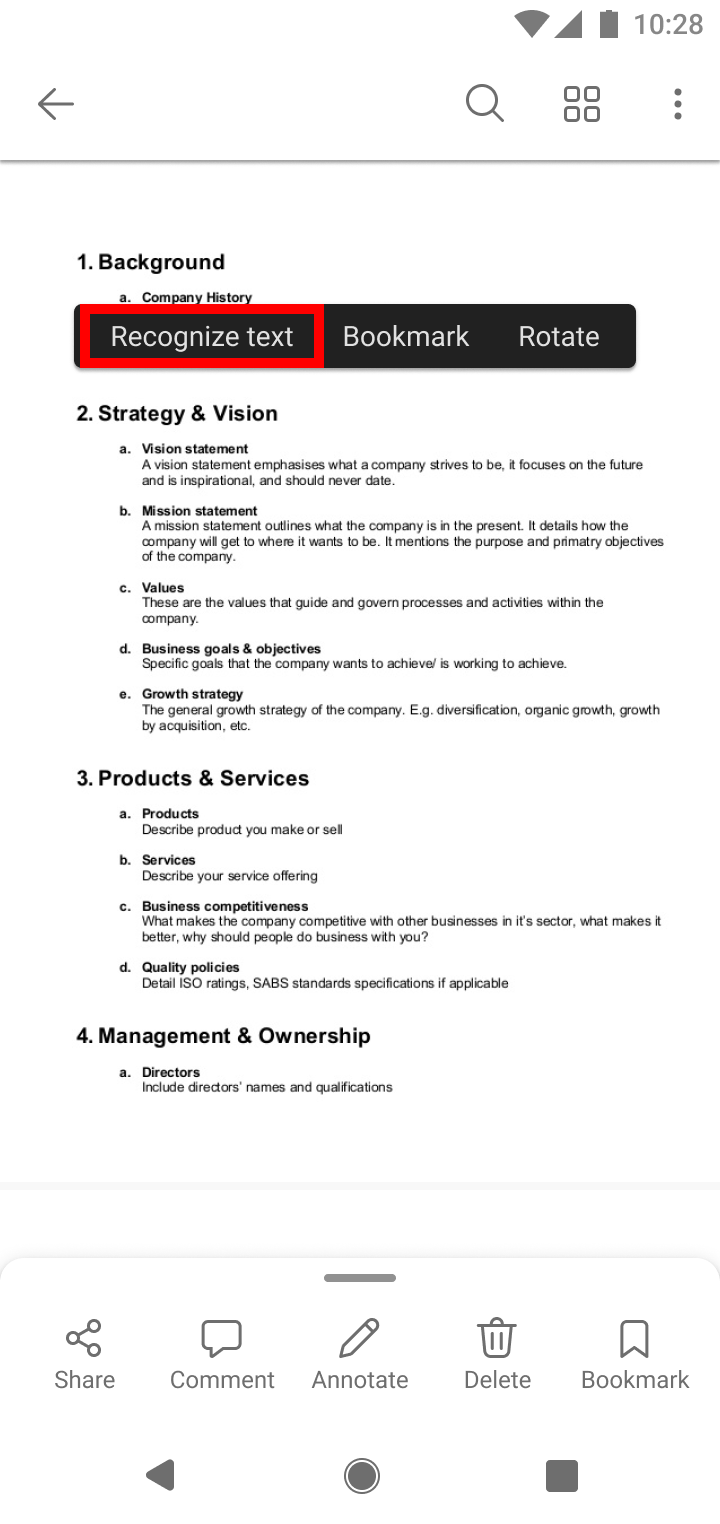
- Long-press the page and select Recognize Text (on iOS) or Recognize text (on Android).
- After OCR completes, users will see the message: Text is now selectable.
[What you can do to prepare:]
- No action is required from admins.
- Some users may see this feature before others as rollout progresses.
- Communicate this change to helpdesk staff to assist users with the new functionality.
- Update internal documentation if you provide guidance on OneDrive mobile features.
Learn more: How to use optical character recognition to read PDFs in OneDrive - Microsoft Support
[Compliance considerations:]
No compliance considerations identified; review as appropriate for your organization.
