Updated May 18, 2026: We have updated the timeline. Thank you for your patience.
[Introduction]
We are introducing structured document generation with Microsoft Forms in SharePoint. This capability will help organizations generate standardized, compliant documents through simple form-driven experiences. It will reduce manual effort, improve template consistency, and support governance across high-volume document workflows. Creating and configuring structured document forms will require a Microsoft 365 Copilot license.
This message is associated with Microsoft Roadmap ID 545896.
[When this will happen]
Public Preview: We began rolling out opt-in in mid-February 2026 and completed by end of March 2026. Starting June 15, the public preview will be on by default.
General availability (Worldwide): We will begin rolling out July 2026 and expect to complete by end of July 2026.
[How this affects your organization]
Who is affected:
- All Microsoft 365 tenants using SharePoint Online
- Users with a Microsoft 365 Copilot license who will create structured document forms
What will happen:
- Users with a Microsoft 365 Copilot license will be able to create structured document forms linked to approved SharePoint templates.
- Business teams will be able to maintain and enforce template governance while enabling document generation across the organization.
- Users will be able to generate consistent, compliant documents by completing a form.
- Existing SharePoint permissions, governance policies, and information management controls will continue to apply.
- Document generation through published forms will be available based on standard SharePoint permissions.
- The feature will be on by default; no admin action will be required.
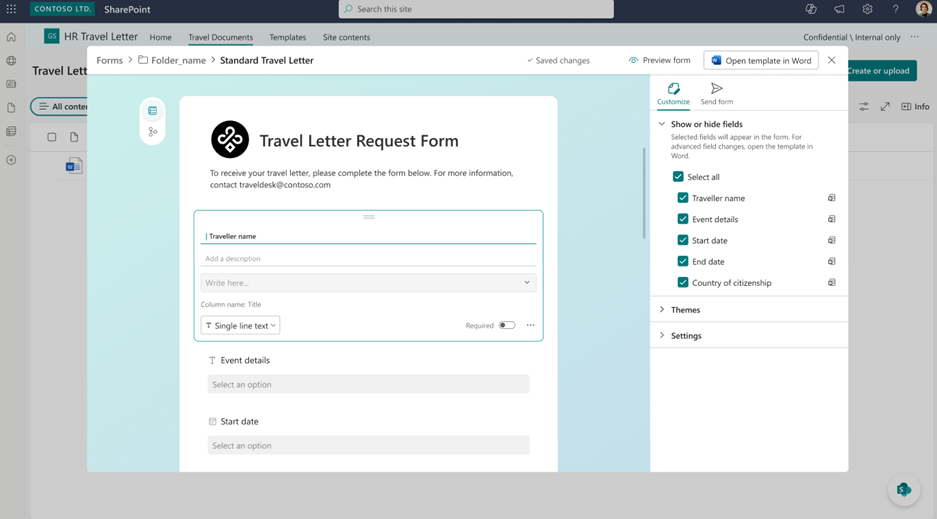
Screenshot 1 - Review and refine AI-suggested fields before publishing:
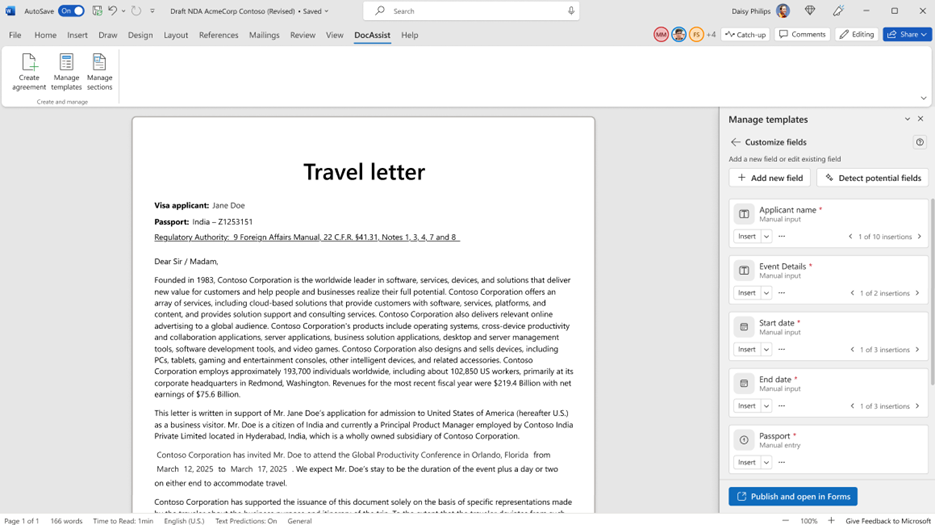
Screenshot 2 – Edit content and apply advanced template customizations, including conditional sections in Word:
[What you can do to prepare]
No admin action is required. You may choose to:
- Inform business stakeholders who manage templates and document workflows.
- Review opportunities to streamline document processes with form-driven generation.
- Update internal documentation or training materials if needed.
Watch the video: Generate documents by filling in the form (18 seconds)
[Compliance considerations]
No compliance considerations identified. Review as appropriate